GitHub Pages Tutorial
Create a repository
Head over to GitHub and create a new repository named username.github.io, where username is your username(or organization name) on GitHub.
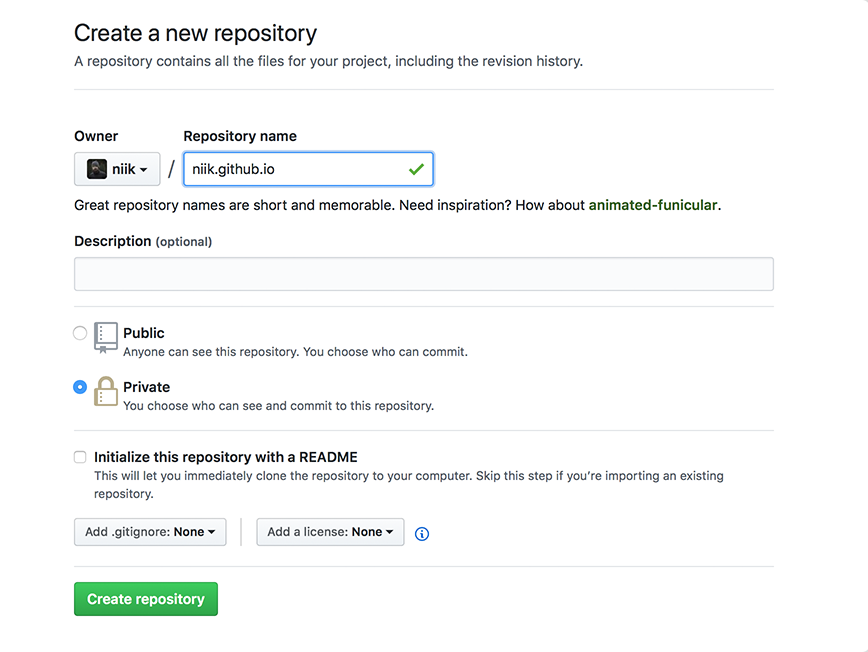
If the first part of the repository doesn’t exactly match your username, it won’t work, so make sure to get it right.
What git client are you using? A terminal
Clone the repository
Go to the folder where you want to store your project, and clone the new repository
~$ git clone https://github.com/username/username.github.io
Hello world
Enter the project folder and add an index.html file
~$ cd username.github.io
~$ echo "Hello World" > index.html
Push it
Add, commit, and push your changes:
~$ git add --all
~$ git commit -m "Initial commit"
~$ git push -u origin master
…and you’re done!
Fire up a browser and go to https://username.github.io
PREVIOUSMarkdown Tutorial - Layout